
When buying a used CNC router, establish the exact machine and modifications, the hardware that will travel with it, a legitimate software and controller path, and the support arrangements available to the next owner. A demonstration on the seller’s bench does not establish that the same setup is included in the sale.
The machine may run with a computer, license or fixture that the seller intends to keep. That can still be a workable offer if the exclusions are explicit and suitable replacements are available. The purchase becomes difficult to compare when an essential part of the demonstrated setup has no clear handover or replacement path.
Identify the actual machine, including changes
A product-family name is a starting point. Generation, size, controller, spindle and later modifications can change which manuals, parts and software information apply. A listing described simply as “upgraded” leaves an important question unanswered: upgraded from what, using which components?
Carbide 3D’s used-Shapeoko guidance notes that buyers sometimes acquire a different machine than they expected and offers help identifying its machines from photographs. For a buyer, the practical lesson is to retain clear labels, photographs and the seller’s description of known changes, rather than relying on a familiar-looking frame.
A current manufacturer page provides a reference for a named model. The TwoTrees ED1 enclosed desktop CNC router, for example, has configuration and accessory information on its official product page. Compare that reference with the machine actually offered; a model name or enclosure photo does not establish which accessories a used seller will supply.

Ask for the documentation associated with disclosed changes as well as the original manual. A controller replacement, for example, makes the controller’s actual identity relevant to software and support. This does not require the buyer to diagnose hidden electrical components. Where identification or condition is uncertain, qualified inspection and the appropriate manufacturer’s advice serve different purposes from the seller’s inventory.
Separate photographed equipment from included equipment
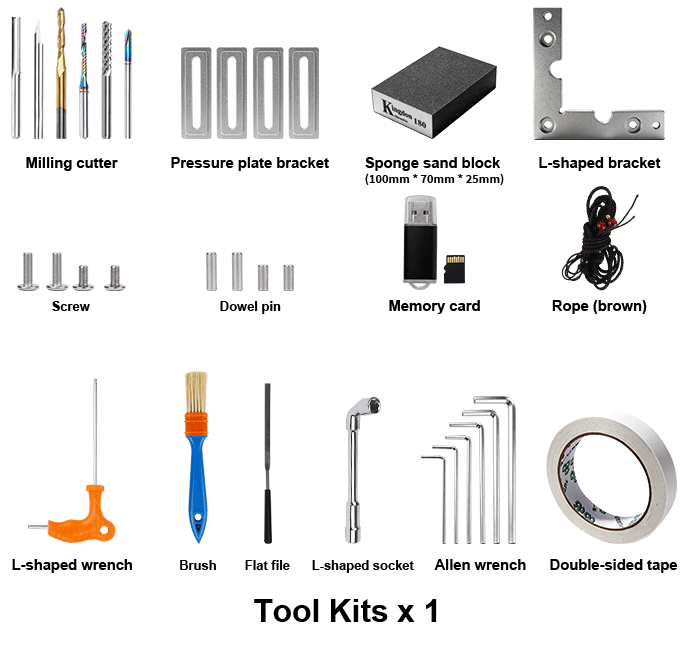
A screen, vise or dust component visible beside a CNC router for sale may belong to the workshop rather than the offer. Ask which items are included, excluded or available separately. Record useful identities and connections: “controller and its matching power supply” communicates more than “electronics included,” while the actual model matters when a replacement must be sourced.
The relevant items depend on the machine. A control computer, touchscreen, cables, toolholders, collets, workholding and extraction components have different roles; every router does not require every item on that list. What matters is whether the intended arrangement is complete enough for the buyer to evaluate, including anything that will have to be supplied independently.
Consumable quantity can distract from that question. A box of spare cutters does not replace a missing essential controller or suitable means of holding stock. Conversely, a missing brush or spare cutter need not invalidate an otherwise well-documented package. Judge an omission by its role and the availability of a suitable replacement, rather than counting accessories.
Establish a software path the buyer can actually use
Software running on the seller’s laptop does not establish that a license transfers with the machine. Clarify whether the computer is included, which applications and versions the demonstration uses, and how the buyer will obtain legitimate access. A computer and the applications installed on it are separate parts of that question.
Vectric’s licensing FAQ illustrates why the exact history matters: its transfer conditions differ between directly purchased licenses, previously transferred licenses and licenses originally bundled with a machine. It tells prospective used-license buyers to confirm transferability with Vectric first. Those are Vectric’s conditions, rather than a rule for every CAM application or evidence of compatibility with a particular TwoTrees machine.
If software is excluded, the buyer may be able to arrange a vendor-approved transfer or obtain a suitable license independently. That replacement must support the actual controller and intended work; choosing another application is not proof that existing projects or machine settings will work unchanged. Shared passwords and continued access to the seller’s account are poor substitutes for a legitimate access arrangement.
Keep controller documentation and any available configuration records with the handover information. They can help a qualified person understand how a modified machine was set up. A backup is a record, however, rather than permission to restore settings blindly or flash firmware. Follow the exact equipment manufacturer’s procedure when establishing the machine at its new location.
Distinguish warranty, training and technical support
These benefits do not necessarily travel together. A manufacturer may need original order information to determine what support is available, while an included training entitlement may belong to the first buyer. A seller’s assurance that “support is included” does not explain those separate conditions.
Carbide 3D provides a concrete example: its used-Shapeoko page says warranty transfer requires the original order information, including the original order number, while included one-to-one training sessions do not transfer. This is its policy for Shapeoko, not a TwoTrees warranty promise or a general rule for used CNC routers. It also does not establish that a particular machine has unexpired coverage.
For the actual machine being considered, establish the manufacturer’s documentation requirements and what warranty, training or technical support remains available. Preserve the relevant order information and written answers with the purchase record. Original documentation can make support questions easier to resolve without proving the machine’s present condition.
Interpret a demonstration in the context of the sale
Consider a hypothetical desktop CNC router demonstrated from a laptop that the seller is keeping. The fixture used for the demonstration is also excluded. The machine may have operated successfully in that setup, but the buyer still needs suitable control software and workholding. Neither omission is resolved by watching the same demonstration again.
Now change the facts: the controller is clearly identified, a supported software option is available to the buyer, and suitable workholding can be obtained for the intended jobs. The exclusions become arrangements that can be evaluated alongside the offer. If the controller remains unidentified or the proposed software depends on someone else’s account, the same apparent package has a much larger unresolved dependency.
This distinction avoids treating every omission as a reason to reject a machine, or every successful cut as proof of a complete purchase. A demonstration gives information about operation in the observed setup. It does not establish license rights, all aspects of mechanical condition or readiness after transport.
Make the offer specific before comparing its price
Retain one agreed description of the named machine and disclosed changes, the included and excluded equipment, the software arrangement, known faults and any items promised later. Put supporting photographs and documents alongside it. This lets the buyer compare the offer with another listing without mentally adding equipment that will stay in the seller’s workshop.
A written inventory records what the parties intend to hand over; it does not certify condition or guarantee a legal remedy. Condition and safety still require appropriate inspection. Before use after a move, follow the exact manufacturer’s procedures and arrange competent assessment where needed, rather than opening energized equipment or bypassing guards to investigate an unknown setup.
The useful decision is whether the essentials are identified and their handover or replacement is practical. A modest accessory omission with a clear replacement can be manageable. An unknown controller, unavailable documentation needed for support, or an unresolved software entitlement changes what the quoted package actually offers.


